
Mastering review and approval software for client work
Share a master with your client, collect comments on the audio and record approval of a version. Release the final files from the same review link.
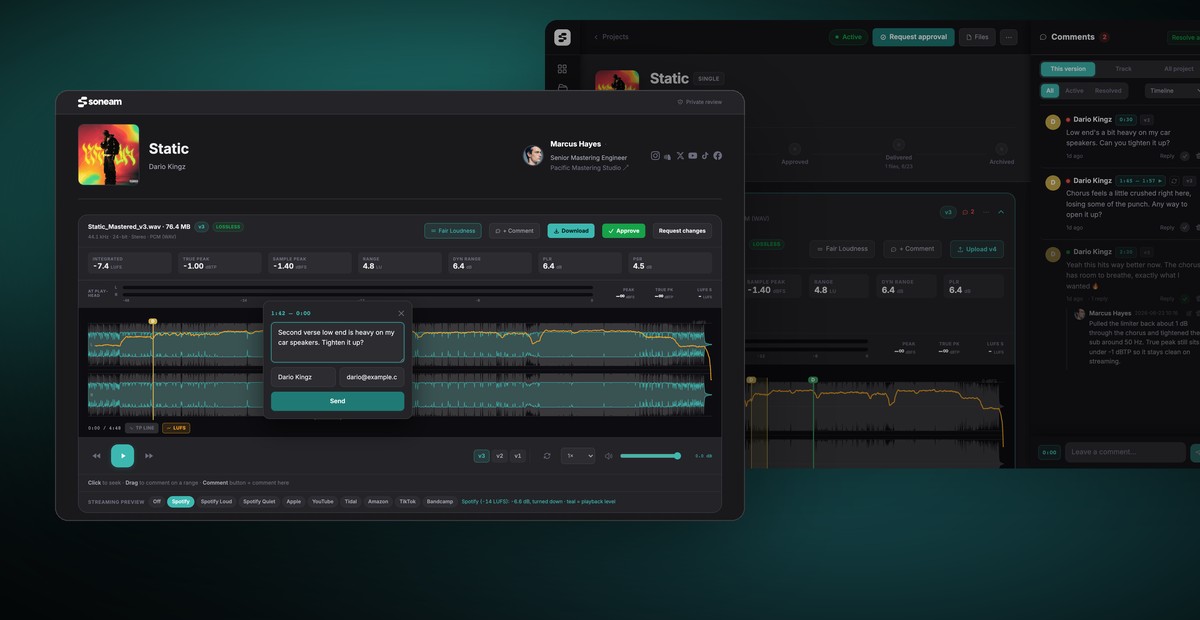
Send a master for review
Upload the master and copy the review link from the project. Your client can listen and comment without creating an account. You can add a password in the link settings.
Review playback uses a lossless FLAC preview. For 16- and 24-bit sources, it preserves the decoded samples; 32-bit float sources are converted to 24-bit for preview. The original upload is retained for delivery. Browser and output-device settings can affect playback. See how lossless playback works.
Review changes at matched loudness
Clients can mark a point or range on the waveform and describe what they want changed. Upload a revision to the same track to retain its history. Open comments carry forward at their existing timestamps, so check their positions if an edit changes the timing.
Fair Loudness matches the level of versions during comparison. Streaming loudness and codec previews let you check selected playback conditions before approval. These are simulations; a service’s settings, encoder and the listener’s device may differ. Read about streaming loudness.
Record approval of a version
The client selects Approve and checks the track and version. The record includes their supplied name, optional email, timestamp and selected version. You can print the record from the project. Supplied reviewer details are not verified identity.
A SHA-256 checksum identifies the file’s bytes. It lets you compare files, but does not prove who listened or automatically guarantee that a later delivery contains the approved version. Check the current version before release. See the approval workflow.
Release the agreed files
- Open Delivery and select the tracks to release.
- Add supporting files, such as stems, a zipped DDP or a credits PDF.
- If payment is due before download, enter the balance and payment instructions.
- Check the files and use Release files. The client downloads from the review link.
A positive unpaid balance keeps downloads locked. On Pro and above, card payments can unlock them automatically when Stripe is connected and card checkout is enabled; for bank transfers, verify receipt before marking the delivery as paid. Soneam charges no transaction fee; payment processing fees apply.
Released tracks follow the current version. Use Unrelease while a replacement is awaiting approval. Download activity is recorded, but a request does not prove that the recipient saved the complete file.
Privacy and access
Unreleased audio is treated as confidential and is not used to train AI. You can password-protect the review link and replace it to close the old URL. Playback access does not prevent a listener from recording the audio. Check the sharing settings.
Plans and alternatives
Free includes playback, comments, approval, delivery, 5 GB, 1 GB of your own uploads a month, unlimited projects and up to 3 versions per track. Pro adds unlimited versions within its storage allowance, branding and Visits; Studio adds webhooks. Clients do not pay for seats. See pricing for the current plans.
For differences in playback, approval, payment and file delivery, see the product comparisons. Compare the steps your client needs to complete, as well as the storage allowance.
Frequently asked questions
Do my clients need an account to review or approve?
No. Clients open the review link to listen, comment and approve. A link password is required if you set one, and reviewer details are requested when needed.
What does the SHA-256 checksum prove?
It identifies the file’s bytes and can be used to check whether two files match. It does not verify the reviewer’s identity or replace checking which version is selected for delivery.
Why does Soneam include a streaming loudness preview?
It helps you review a master at selected loudness references before release. Codec previews add selected encoding conditions. Actual streaming playback varies with the service, settings and device.
Is my unreleased music safe?
Files are stored privately and your audio is not used to train AI. You can password-protect a review link or replace it to disable the old URL. Anyone with playback access may still record the audio.
How is Soneam different from Samply, Filepass or Audome?
Soneam combines client review, version approval, loudness and codec previews, and payment-controlled delivery. The comparison pages describe each product separately, including shared features and limits.
Is the approval legally binding like an e-signature?
Soneam records approval of a version with supplied reviewer details and a timestamp. It does not verify identity and is not a formal e-signature service.

Review a mix with your client
Send a review link for lossless playback, waveform comments and approval. Clients do not need an account. Review links have no expiry unless you set one. On Free, released delivery files are available for 30 days at a time and can be released again.