
Soneam vs Filepass: payment and audio review
Compare payment-controlled downloads, review tools, storage and pricing in Soneam and Filepass.
Both products let clients review audio and require payment before downloading. Compare the payment process, revision tools and storage limits that apply to your work.
Choosing around your revision process
Keep Filepass in the running if its revision checklist and payment flow already work for your clients. Try Soneam when the missing step is comparing two versions at matched loudness or checking a recorded approval before delivery. On Free you can test manual payment confirmation; card checkout requires Pro or above.
At a glance
| Soneam | Filepass | |
|---|---|---|
| Free tier | Yes: 5 GB and 1 GB of your own uploads a month, unlimited projects, up to 3 versions per track | No (14-day trial, no card required) |
| Lossless review playback | Yes (FLAC, no login) | Yes (WAV streaming) |
| Payment-gated download | Yes, every plan · No Soneam transaction fee | Yes, both paid plans |
| Client payment methods | Card via your Stripe on Pro and above; external payments on every plan after you confirm receipt | Card or PayPal at unlock time |
| Streaming loudness preview in review | Yes | Not documented in sources checked |
| LUFS / true-peak metering | Yes | Not documented in sources checked |
| Formal approval record | Yes, printable | Payment unlock documented; separate approval record not confirmed |
| Checksum on delivery (SHA-256) | Yes | Not documented in sources checked |
| Comment carry-over across versions | Yes | No (comments become a to-do list) |
| Storage | 5 GB free, 500 GB or 1 TB paid | 256 GB / 512 GB, +250 GB blocks |
| Upload caps | No monthly cap on Pro or Studio; Free allows 1 GB of your own uploads a month, and client uploads are not counted. 600 MB a master, 50 GB for everything else | 10 GB/month on the lower plan |
| File types accepted | Audio, ZIP and supported DAW projects from clients; any type for project files and delivery extras | FLAC, MP3, WAV and ZIP |
| Your logo on the client page | Pro and up | Listed on both pricing plans; confirm branding options |
| Headline pricing | Free / $10 / $20 ($8 / $16 billed yearly) / Enterprise on request | $19-$39/mo billed yearly ($24-$49 monthly) |
Use the linked product documentation to confirm plan details. “Not documented” means the sources checked did not establish the feature; it does not prove the product lacks it. Sources: Filepass pricing, charging for files and trial terms.
What your client actually sees
This Soneam page combines the player, comments and released files. If a balance is unpaid, the client sees the payment instructions before they can download.
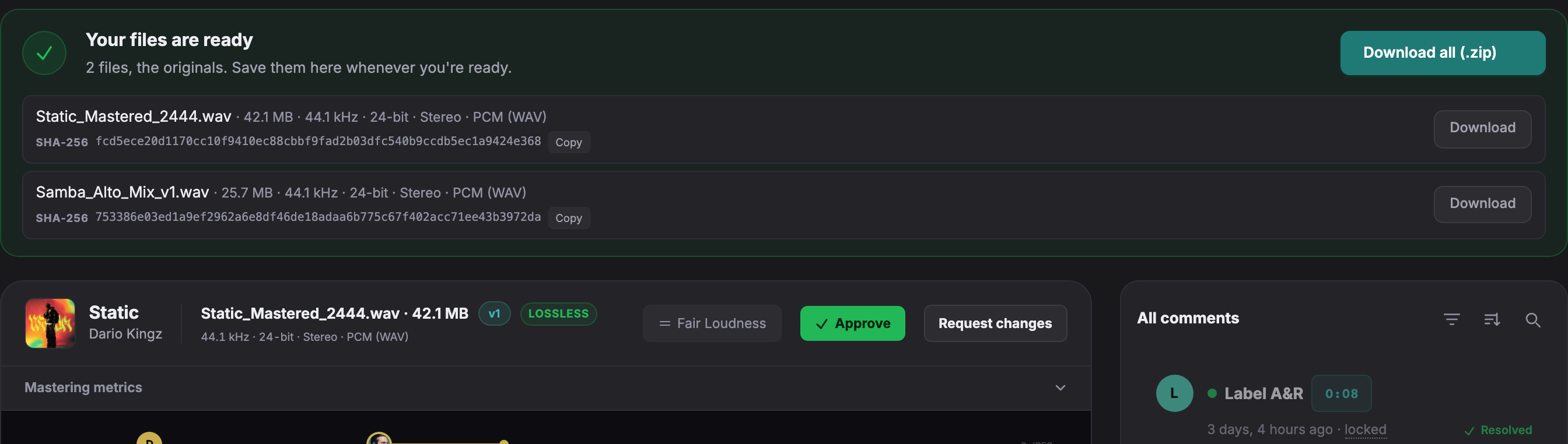
Open a live client page to try playback, comments and version comparison without an account.
Payment controls in both products
Filepass lists its paywall on both paid plans. Soneam includes a manual payment lock on every plan, including Free. Card checkout requires Pro or above. Soneam charges no transaction fee; payment providers charge their own fees. On Pro and above, with Stripe connected, successful card payment unlocks the files. External payments require your confirmation after receipt.
Storage and upload limits
Filepass’s pricing page lists 256 GB with a 10 GB monthly upload limit on Part-Time, and 512 GB with no monthly upload limit on Pro. Soneam’s paid plans hold 500 GB or 1 TB with no monthly upload limit. Free holds 5 GB and allows 1 GB of your own uploads a month; files clients send through an upload link are not counted. Individual file limits still apply.
Checking revisions and approval
Filepass turns feedback into a to-do list. Soneam carries open text comments and their text replies into the next version and offers level-matched comparison. In Soneam, approval and payment are separate records: receiving payment does not approve a version, and approval does not release the files.
Payment and revision tools
- Line items. List the agreed charges in Delivery.
- Payment instructions. Add details for a bank transfer or other external payment.
- Review before payment. Clients can listen and comment while downloads remain locked.
- Approval records. Check which version was accepted before releasing files.
- File checksums. SHA-256 values let recipients check the downloaded files.
Choose storage after checking the payment workflow. See plans and included features.
Finish the payment record before moving
Keep receipts and completed deliveries with the original job. Copying audio into Soneam does not import Filepass payment records or comments. Start the next revision round in one agreed place so the client does not receive competing payment or approval requests.
Free: up to 3 versions per track. Pro and above: unlimited versions within your storage allowance. Existing versions, comments, approvals and deliveries remain available. The limit applies when adding a version, including on existing projects.

Frequently asked questions
Is Soneam a good Filepass alternative?
Both products support payment-controlled downloads. Soneam includes a manual payment lock on Free; card checkout requires Pro or above. Try it if you need version-specific approval and level-matched revision comparison alongside delivery.
What does Filepass do better than Soneam?
Filepass turns feedback into a revision checklist. If that is how you track work and your clients already use its payment flow, keep that workflow in your comparison. Compare storage and upload allowances separately from the review workflow.
How do Soneam and Filepass prices compare?
Filepass lists $24 and $49 monthly, or $19 and $39 per month billed yearly, with a 14-day trial. Soneam includes 5 GB, 1 GB of your own uploads a month and unlimited projects on Free, then 500 GB for $10 and 1 TB for $20 monthly ($8 and $16 a month billed yearly), with Enterprise on request. Payment processing fees are separate.

Test payment-controlled delivery
Try a delivery with manual payment confirmation on Free. Card checkout through your Stripe account requires Pro or above; Stripe fees apply.