
Soneam vs Notetracks: audio review workflows
Compare DAW comment export, client access, versions, approval and delivery in Notetracks and Soneam.
Notetracks includes tools for bringing review notes into an editing session. Soneam focuses on reviewing versions, recording approval and releasing files to a client. Both support comments on audio.
Audio delivery or a mixed-media edit
Choose Notetracks when the job needs video collaboration, drawing annotations or transcription alongside audio notes. Try Soneam for finished music that needs version comparison, client approval and file delivery. Both support DAW comment export, so that feature alone is not a reason to migrate.
At a glance
| Soneam | Notetracks | |
|---|---|---|
| Storage | 5 GB free; 500 GB or 1 TB paid | Trial allowance varies; 2 GB Pro; 25 GB Team |
| Lossless review playback | Yes (FLAC) | Not documented in sources checked |
| Client access | No account required | Guests supported, but invites can route to registration |
| Versions + level-matched A/B | Yes (Fair Loudness) | Not documented in sources checked |
| Streaming loudness preview / LUFS | Yes | Not documented in sources checked |
| Formal approval record | Yes, printable | Not documented in sources checked |
| Voice notes on comments | Every plan, including Free | Team plan, $29 a user |
| Your logo on the client page | Pro and up | Enterprise, price on request |
| Protected delivery + checksum | Yes (password, revoke, SHA-256) | Not documented in sources checked |
| DAW comment export | Yes, Pro and above | Yes: Pro Tools, Audition, Audacity, Hindenburg |
| Video review on the same timeline | No (audio only) | Yes (Team plan) |
| Pricing model | Flat: Free / $10 / $20 ($8 / $16 billed yearly) / Enterprise on request | Trial / Starter; Pro $15/user/mo; Team $29/user/mo |
Use the linked product documentation to confirm plan details. “Not documented” means the sources checked did not establish the feature; it does not prove the product lacks it. Sources: Notetracks features and pricing.
What your client actually sees
Soneam clients open the review link without an account. The page includes the audio, comments, approval controls and any files you have released.
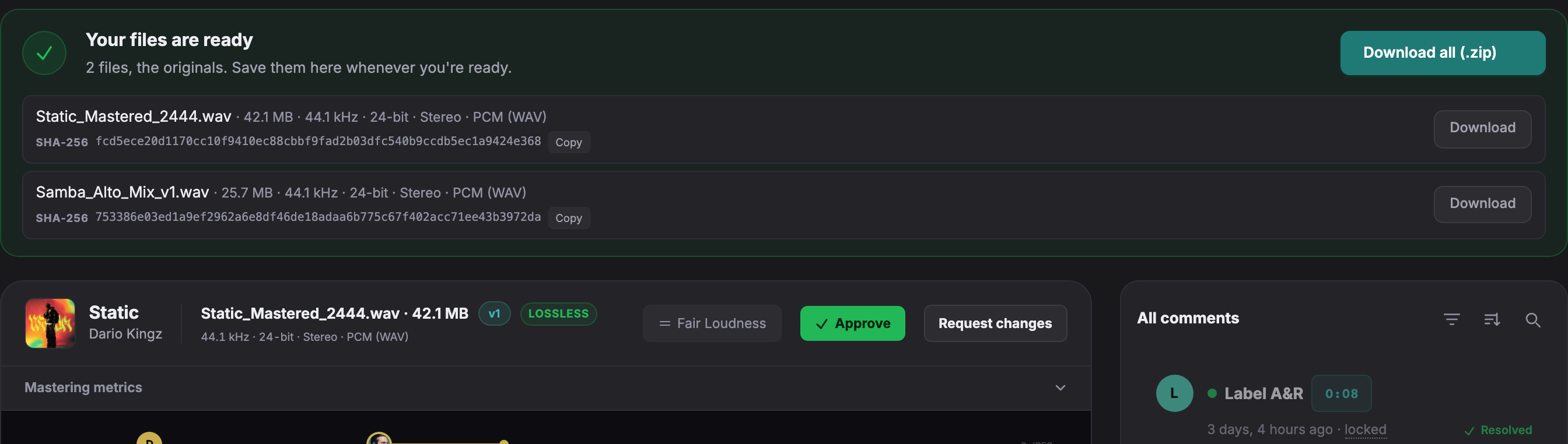
Open a live client page to try playback, comments and version comparison without an account.
Bringing comments into the editor
Notetracks supports comment export for DAWs including Pro Tools, Adobe Audition, Audacity and Hindenburg. It also offers video collaboration on Team. Soneam offers DAW marker export on Pro and above. It does not review video.
Keeping versions and delivery together
Soneam retains versions under each track. Open text comments and their text replies carry forward at the same timestamps, and Fair Loudness matches playback level during comparison. After editing, request approval of the intended version and check the delivery files before release.
Accounts and storage
Notetracks supports collaborators and per-user plans. Its pricing page lists a 7-day Starter trial followed by $9/month with 1 GB, while its annual view shows a 500 MB trial. We could not establish a permanent free allowance from those conflicting entries. Confirm trial terms at signup. Pro lists 2 GB and Team 25 GB. Soneam clients do not need accounts, and its plans range from 5 GB to 1 TB. Estimate the storage required for your files and revisions.
Client review features
- Client access. Reviewers use a link without an account.
- Version comparison. Compare revisions at matched loudness.
- Comments. Add text, recorded voice notes or attachments at a point or range.
- Internal notes. Keep your own notes separate from client-visible comments.
- Delivery. Release approved audio and supporting files from the review page.
Playback, comments, approval and delivery are included on every plan. See plans and included features.
Keep the edit notes with the original job
A copy of the audio does not bring Notetracks comments, drawings or transcripts into Soneam. Retain the source project for those records. Test one finished episode or master before changing where a team reviews an active edit.
Free: up to 3 versions per track. Pro and above: unlimited versions within your storage allowance. Existing versions, comments, approvals and deliveries remain available. The limit applies when adding a version, including on existing projects.

Frequently asked questions
Is Soneam a good Notetracks alternative for music?
Soneam supports music review with lossless playback, version comparison, approval records and delivery. Both offer DAW comment export; Notetracks also supports video collaboration. Choose based on the editing and review steps you need.
What does Notetracks do better than Soneam?
Notetracks offers video collaboration, drawing annotations and transcription. Those suit jobs where reviewers need to work with picture or spoken content as well as audio. DAW marker export is available in both products; Soneam does not review video.
Do clients need an account on Notetracks or Soneam?
Soneam clients use a review link without registration. Notetracks supports guest collaborators; check its invitation and sharing settings to confirm the access flow your clients will use.

Review an episode or a master
Use a file from your normal work to check comments, revisions and approval in Soneam. For episode workflows, see the podcast page.