
Frame.io for audio: playback and review features
Compare Frame.io audio proxies with Soneam’s lossless review playback, version approval and delivery tools.
Frame.io supports audio uploads as well as video. Its documented audio preview uses an AAC proxy. This comparison explains that playback path and the review features to check for music delivery.
Keep picture review with the picture
Keep Frame.io when comments depend on a frame, an edit or synchronization with video. Try Soneam for a separate audio-only approval, such as choosing a master or checking a vocal revision through lossless playback. Moving the audio review will not replace a video editor’s review timeline or integrations.
At a glance
| Soneam | Frame.io | |
|---|---|---|
| Review playback | Lossless FLAC | AAC 128 kbps proxy |
| Loudness tooling | Streaming preview, LUFS, true peak | Not documented in sources checked |
| Version compare | Level-matched A/B (Fair Loudness) | Version stacks, side-by-side video comparison |
| Approval | Recorded sign-off of a specific version, printable | Status metadata (Approved / Needs Review) |
| Delivery of originals | Password-protected, revocable, SHA-256 checksum | Download of originals; check sharing and download settings |
| Client access | No-login link | No-login share links |
| File on a comment | Every plan, including Free | Pro plan or higher |
| Internal-only comments | Yes | Yes, marked with a lock |
| Free tier | 5 GB and 1 GB of your own uploads a month, unlimited projects, up to 3 versions per track | 2 GB, 2 projects |
| Pricing model | Flat: Free / $10 / $20 ($8 / $16 billed yearly) / Enterprise on request | Per seat: $15 to $25/member/mo |
Use the linked product documentation to confirm plan details. “Not documented” means the sources checked did not establish the feature; it does not prove the product lacks it. Sources: Frame.io proxy specifications and pricing.
What your client actually sees
The Soneam client page uses a lossless FLAC preview for audio review and lists released originals separately for download.
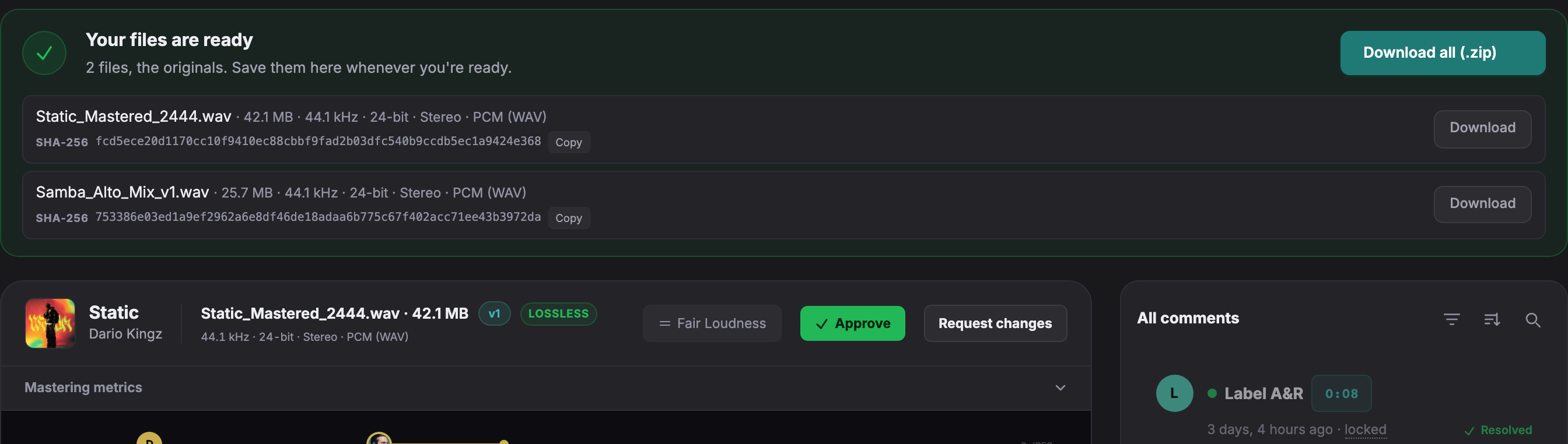
Open a live client page to try playback, comments and version comparison without an account.
How Frame.io previews audio
Frame.io’s documentation specifies AAC audio proxies at 128 kbps in MP4. It uses the first audio track when creating the preview; its documentation distinguishes audio tracks from channels within one track. Original files remain available for download.
Choosing the playback path
A lossy preview may be sufficient for edit notes, but it can differ from the master. If you are judging encoding artifacts or fine detail, compare the original or a lossless preview. Lossless playback alone does not guarantee identical sound on every device.
Video and audio review
Frame.io includes video review, version stacks and editing integrations. Soneam handles audio review, level-matched version comparison and delivery. If a project includes both picture and separate audio masters, decide which parts need each review workflow.
Audio review and file delivery
- Lossless preview. Review playback uses FLAC; 32-bit float sources are converted to 24-bit for preview.
- Metering. Check integrated LUFS and true peak for each version.
- Playback previews. Compare selected loudness references and codec settings.
- Recorded comments. Voice notes are recorded in the browser and attached to the waveform.
- Supporting files. Add stems, zipped DDPs and PDFs to the delivery.
Reviewers do not require paid seats. See plans and included features.
Agree where picture and audio approvals live
If picture review remains in Frame.io, name the corresponding edit in the Soneam project before asking for audio approval. Retain the original review records. An audio upload does not import Frame.io comments, version stacks or approvals.
Free: up to 3 versions per track. Pro and above: unlimited versions within your storage allowance. Existing versions, comments, approvals and deliveries remain available. The limit applies when adding a version, including on existing projects.

Frequently asked questions
Can you use Frame.io for music review?
Yes. Frame.io supports audio uploads, with a documented AAC 128 kbps browser preview. The original can be downloaded separately. Check whether that preview is appropriate for the decisions you and the client need to make.
Is there a Frame.io alternative built for audio?
Soneam provides audio review links with lossless FLAC playback, waveform comments, loudness and codec previews, version approval and file delivery. It does not review video.
What is Frame.io still better at?
Frame.io supports picture review, frame-based comments, version stacks and video editing integrations. Use a video review workflow when decisions depend on picture as well as sound.

Review a master in Soneam
Check lossless playback, comments and version approval on the Free plan. Your client can use the review link without an account.