
How can I hear my master after Spotify normalizes it?
Soneam’s free loudness tool estimates Spotify’s playback level for your master (Normal, normalization on) and plays it there. No account needed.
Try it with your master No file to hand? Listen on a sample review page with the same preview.
Short answer: drop the master into Soneam’s free loudness tool and choose Spotify. The tool calculates Spotify’s playback adjustment from the measured loudness and true peak, and plays your master at that level. It is an estimate for a single track in Spotify’s default Normal setting with normalization on, not a recording of Spotify’s player.
The tool sends the file to our server for analysis and deletes it once measured. An encode you listen to is kept for 30 minutes.
In Normal, Spotify plays a loud master down toward −14 LUFS: a master at −8 LUFS plays about 6 dB quieter. A quiet master is turned up only as far as its peaks allow. Spotify’s own example is a −20 LUFS track peaking at −5 dBTP, turned up 4 dB to −16 LUFS. Loud (−11 LUFS) turns quiet tracks up through a limiter, and Quiet uses −19 LUFS (Spotify’s loudness normalization page).
-
Open the free loudness tool and drop a WAV, FLAC or AIFF master. It measures integrated loudness and true peak.

-
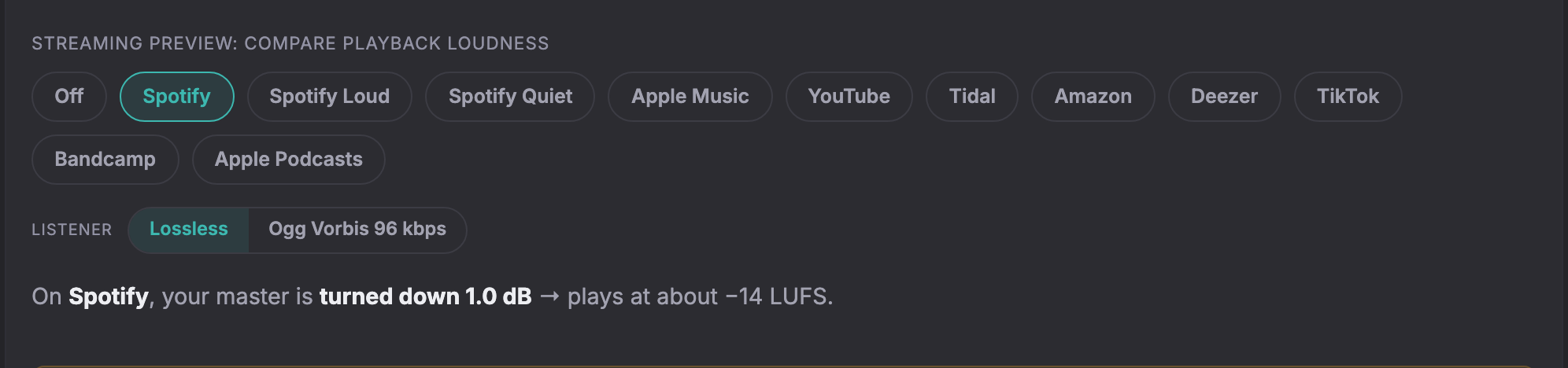
Under Streaming preview, choose Spotify. The readout shows how many dB Spotify changes the level and where the master plays. Spotify Loud and Spotify Quiet show the other two settings.
-
Press play. Under Listener, switch between Lossless and Ogg Vorbis 96 kbps to hear a lossy test encode at the same level. Choose Off to hear the master at its delivered level.
Let your client hear it at that level before approving
If the master is for a client, they may ask why it sounds quieter on Spotify than in your mix session. Put the master on a Soneam review link and send it. The client opens it in a browser without an account, chooses Spotify in the same preview, leaves comments on the waveform and approves the version they heard. The approval record names that version.
See the client review page · Create a review link for your master
What the estimate does not reproduce
Listeners can change the setting or turn normalization off, album playback can use album loudness, and devices apply their own processing. The Ogg Vorbis file is a test encode, not Spotify’s own output. Spotify’s current behavior is described on its loudness normalization page.
−14 LUFS is a playback reference, not a required mastering level. Compare with releases in the same genre at matched loudness before deciding how loud the master should be.
Doing it in a DAW instead
Measure the master’s integrated loudness and true peak. For a loud master, add a gain plugin after the limiter set to the difference from the reference: −14 − (−8) = −6 dB. For a quiet master in Normal, add no more gain than keeps the peaks at −1 dB. Gain-match a reference release the same way and switch between them. For the codec, bounce a copy through an AAC or Ogg encoder and play that copy.
Try it in Soneam
Hear a master at Spotify’s level on the client review page, then create a review link for your own.
You need a free account to upload a mix. Your clients do not need one to listen or comment.
Not covered here? Write to support@soneam.com.