
How do I share a version for review?
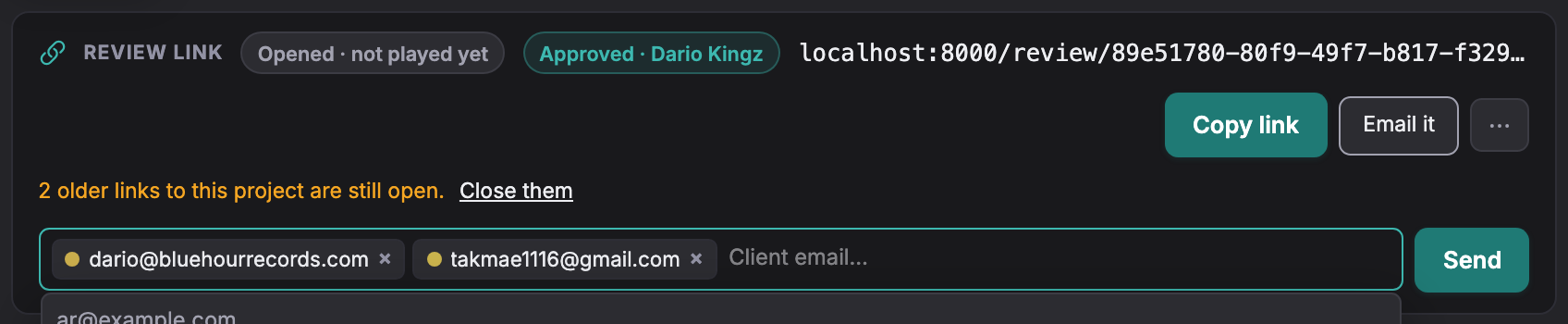
Copy the review link under the project title, or use Email link to send it from Soneam.
A project receives its review link when you add the first audio file. The link appears under the project title. It stays the same when you add revisions.
Free allows up to 3 retained versions per track. Pro and above allow unlimited versions within the storage allowance. Existing versions and review links remain available when the limit is reached.
-
Open the project. Find the review link beneath the title, with Copy link and Email link beside it.

-
Copy link copies the URL. Email link opens an address row for sending the link from Soneam.
-
Clients can browse version history by default. To restrict the player to the current version, open the link menu and choose Show only the current version.
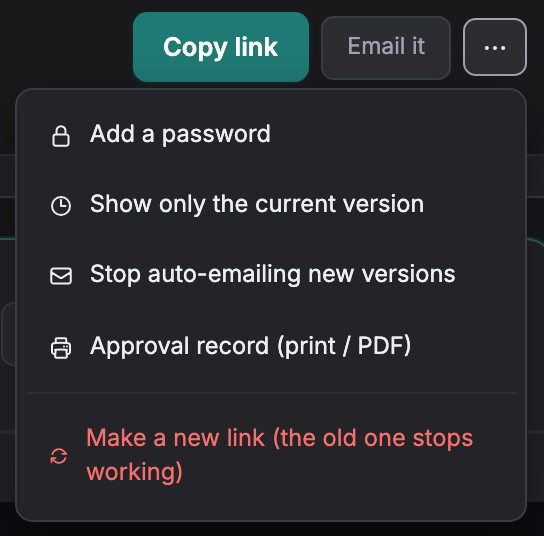
The link’s status chip summarizes sharing and review activity. Copying the link counts as sharing; it does not prove the client received it.
Version-history settings control which versions the client can browse. Approval still identifies the selected version. Links have no expiry unless you set one. Playback uses a FLAC preview; released downloads use the uploaded original.
Not covered here? Write to support@soneam.com.